dimespin:

There’s a new spam virus going around that causes the victim’s blog to send messages to people they follow asking for fractions of bitcoin. So, just to let you know: I would never ask anyone for bitcoin, and chances are, anyone else asking you for it didn’t really send the message

Don’t click any links if you do get such a message, that’s the vector of infection.


Tags:

#PSA #Tumblr: a User’s Guide #(I have been known to use bitcoin in the past but I gave up because the transaction fees these days are just awful)

adzolotl:

adzolotl:

argumate reblogged your post and added: “adzolotl: someone mentioned “that 8-bit Bring Me To Life cover”, so I…”

what do you mean the good one

you called it a timeless classic

did I just get pranked into listening to multiple 8-bit renditions of Bring Me To Life

dear Tumblr staff:

if you’re gonna let us use italics, maybe make them render everywhere hmm

consider the difference between “what do you mean the good one” and “what do you mean the good one”

#whoops 

…I know I’ve been inconsistent on italics vs asterisks to indicate emphasis here, but that’s it, I’m officially going with asterisks.


Tags:

#Tumblr: a User’s Guide

{{previous post in sequence}}


mazurah:

squelchsquelch:

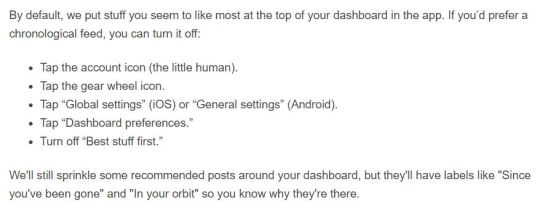
Reminder to turn off tumblr’s stupid “best first” feature now that it’s rolled out!

Go to profile>settings (the gear)>global settings>dashboard preferences

How to Get Rid of This Shit for Dummies:

Okay, I could only figure out how to turn this off on MOBILE! It doesn’t seem to give you the option on desktop. So I’m sharing an even greater in-depth tutorial (with images) on how to turn this off.

On MOBILE go to the fourth tab at the bottom that looks like a little person: 

tumblr_inline_oyt9d3bmkn1ujfscj_540

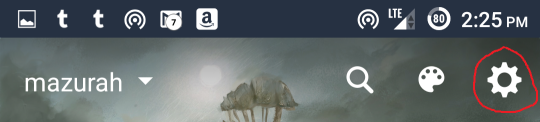
Then at the top of the screen click the little gear

tumblr_inline_oyt9d9tagt1ujfscj_540

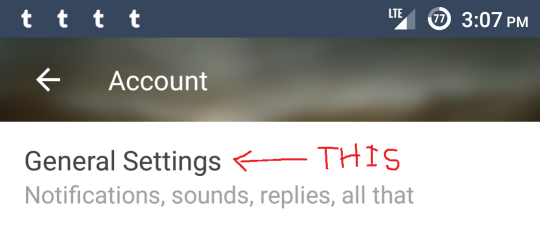
At the top of the screen find the option General Settings

tumblr_inline_oyta9laqve1ujfscj_540

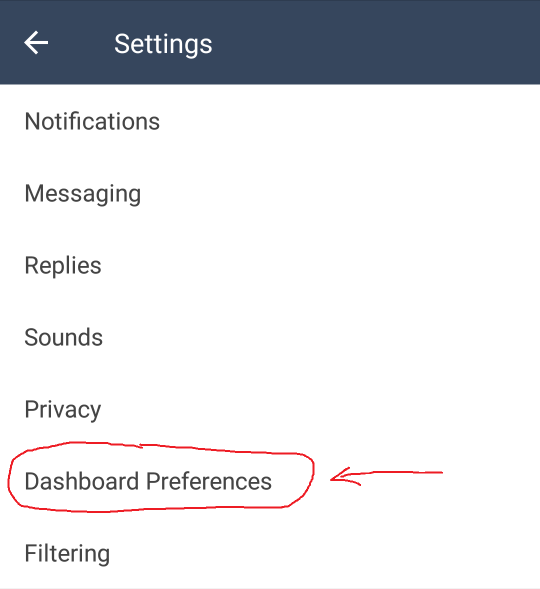
Then find Dashboard Preferences

tumblr_inline_oyta4i0ym21ujfscj_540

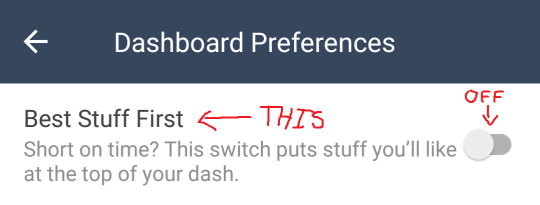
And switch “Best Stuff First” to the OFF position: 

tumblr_inline_oyta62knei1ujfscj_540

To reiterate, that’s: 

Profile – Settings – General Settings – Dashboard Preferences – Best Stuff First – OFF 

In my experience, settings DO extend across platforms, so if you turn it off on mobile, you should be good on the desktop version as well. 

Please reblog!


Tags:

#The Great Tumblr Apocalypse #Tumblr: a User’s Guide #oh look an update #here’s a reminder for those of you who use mobile #now that they’ve actually released it

preoccupiedpepper:

staff:

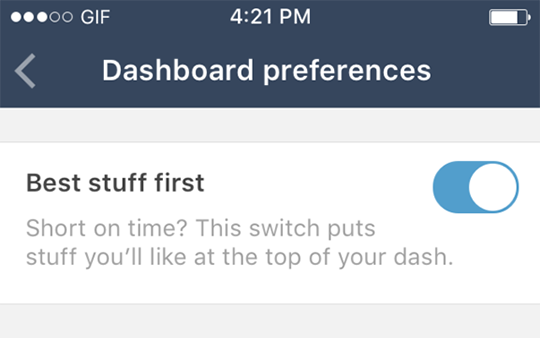
Here it is: Best stuff first

Extremely handy if you follow a lot of people and hate missing anything good. 

Best Stuff First moves the best stuff on your dashboard—mhm!—right up to the top. 

It’s rolling out this week on iOS and Android, and comes with this Help Center article.  

Thanks! ✌️

Head’s up folks! Tumblr decided to shit the bed and go non-chronological!

This bullshit is being rolled out this week and it’s going to be default!

tumblr_inline_oy15bmgn3v1r1bzpf_540

Tags:

#…holy shit #I saw the original staff post but I missed the part where it’s *on by default* #I don’t use mobile but I’ll have to keep an eye on my settings to make sure they don’t do this to my laptop #The Great Tumblr Apocalypse #Tumblr: a User’s Guide


{{next post in sequence}}

moral-autism:

thathopeyetlives:

moral-autism:

thathopeyetlives:

I wish tumblr savior worked on people’s blogs

It does, or at least it used to! Input their URL and see what happens.

Isn’t working for me. Dash is kept clean, but not blogs. (It seems like it would be tricky for it to work, since blogs can have so much custom formatting and HTML)

Oh! You’re not trying to use it as a soft block-ish option. You’re trying to use it while viewing blogs. Whoops.

I don’t know about Tumblr Savior per se, but last I checked new-Xkit Blacklist works if you look at the blog’s dashboard view:

https://www.tumblr.com/dashboard/blog/[insert blog username here]

As far as I know, there is no way to do things like “have blacklist function while looking at a particular tag within a person’s blog”, but still, it’s something.


Tags:

#Tumblr: a User’s Guide #reply via reblog

Tumblr’s violating your privacy by default again

ashkaztra:

solluxisms:

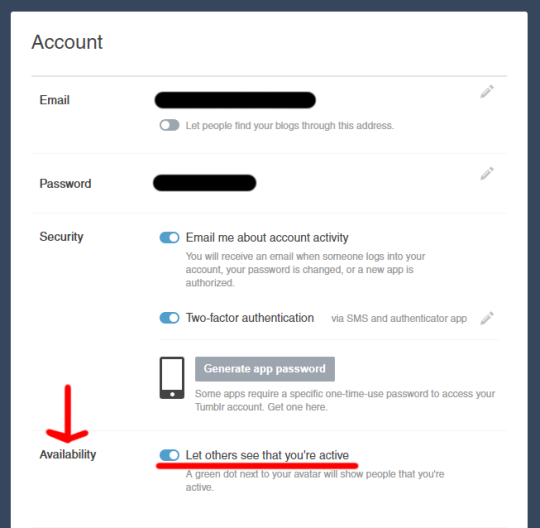
Hey guys, a quick note. Tumblr just added a ‘feature’ that shows if you’re online or not. The only place I see it is in the messenger, though it might be elsewhere. It’s showing a friend as online even though they just have a tumblr tab open that they haven’t looked at in hours. It also shows how long ago they were active. I don’t know how it interacts with the app.

I have a few problems with this:

  • I personally don’t like the feeling of being stalked
  • People could actually stalk you
  • Person A could get mad at Person B because it said Person B was online but they weren’t (and thus didn’t respond) – or just wasn’t up to talking
  • Person X could message Person Y and get anxious when person Y doesn’t respond, since it says they’re online

I found the place to turn it off in account settings. There’s a section called “Availability” where you can toggle off the functionality.

tumblr_inline_otcjx0jn531r3ms5p_540

Safe browsing, folks. 


Tags:

#The Great Tumblr Apocalypse #Tumblr: a User’s Guide #(didn’t reblog this right away because it wasn’t showing up for me yet and I wanted to check it for myself first) #(still not seeing any green dots (maybe just looking in the wrong places) but the availability option has shown up now) #((I turned it off))

(I finished writing up my tags page today, by the way. I expect I’ll think of more tags I forgot to include later, and there will probably be new tags to add at some point, but I think it’s reached a state where I can call it v1.)


Tags:

#Brin talks about herself for no particular reason #(haven’t decided yet if I’m going to include that one) #oh look an original post

codeman38:

sujthechef:

dr-archeville:

ayellowbirds:

codeman38:

…OMG. I’ve been noticing that browsing my Tumblr dash in Firefox uses up around 1/3 of my CPU cycles, even with ad scripts blocked, but couldn’t figure out why.

After reading some developer tools documentation online, I managed to pinpoint that it was something involving CSS animations, but couldn’t find any obvious element that was animating on the page. So then I did a bit more debugging to see what animations were being reported by the document inspector.

It’s the mouseover animation on the Tumblr logo. Which, apparently, is coded in such a way that it keeps animating in the background even when the mouse is nowhere near it (!?!?!?!).

this site is so damn badly designed, what the heck.

Yikes

@codeman38 question: Have you found a good way to solve the problem?

I have had all kinds of issues with tumblr eating resources, and recently had to resort to one of those add blocking extensions (which I am generally against on principle, but if your ads are so terrible i can’t use your site with them on…)

Anyway, I had major performance improvement, but I too still have problems with tumblr eating resources and this… makes some sense to me.

See this post with a code snippet that can be used with the Stylish extension. This is what I’m currently using, and it definitely reduces the CPU usage for me.


Tags:

#Tumblr: a User’s Guide #oh so *that’s* what that was #I’d kind of been vaguely assuming it was some sort of nonconsensual distributed computing #I suppose I should have not attributed to malice what could adequately be attributed to stupidity #I don’t think I can be bothered trying to fix it #when it started I just stopped leaving my dashboard tab open when I wasn’t actively using it #and that’s been good enough for me #but you might find the Stylish thing worth a try

jaiwithani:

fermatas-theorem:

saniika:

unwrapping:

Unmentionables on Tumblr:
When you enter the @ symbol and a username on Tumblr, you can mention a blog, sending that blog account a notification. Unless you can’t. Here are some cases where Tumblr usernames won’t show up in results when you try to “@mention” them, or the mention notification won’t go through.

  • The setting for “Allow this blog to appear in search results” is turned off for the blog. User mention relies on a Tumblr user search, and disallowing all searches for the blog includes opting out of the user mention search.
  • The blog is identified as adult-oriented/not safe for work in its blog settings (and you are not following the NSFW blog).
  • The blog is a secondary blog that is password protected.
  • The blog account doing the mentioning is so new that Tumblr won’t send mention notifications as an anti-spam measure.
  • The blog account doing the mentioning was blocked. So if you block a blog, that shunned blog cannot “@mention” your blog on Tumblr.

The mystery about the tagging. Now you know. 

@jaiwithani any of this describe you and your ability-to-be-tagged problems?

I can see mentions like this just fine, but my attempts to follow things that get tagged #jaiwithani have been met with sadness and despair.


Tags:

#Tumblr: a User’s Guide

Anonymous asked: How are you managing to be underweight in a country where obesity is correlated with poverty?

{{previous post in sequence}}


brin-bellway:

sinesalvatorem:

Poor people in the US are overweight because they substitute higher-quality expensive food for lower-quality cheap food. I’m underweight because I substitute eating for… Not doing that.

Preparing food costs me a huge number of spoons, I have almost no ability to transport myself to places that sell cheaply prepared food, and food delivery is never cheap. Given these options, not actually eating usually makes perfect sense.

(food cw, disordered eating cw)

(I’ve heard rumours the first-degree ask bug might have been fixed. Let’s find out.)

>>I have almost no ability to transport myself to places that sell cheaply prepared food<<

How are you defining “prepared”?

When you make/attempt spoon-consuming homemade food, where are you getting the ingredients from? Stores that sell ingredients usually also sell granola bars, peanut butter, crackers, I was going to say apples but then I remembered your sensory issues. Bananas if you can take them sensory-wise and reliably eat them during the ~3-day window between underripe and overripe. If you have the spoons to reliably handle refrigerators, orange juice (consume within 1.5 – 2 weeks of opening), and if you’ve the lactose tolerance for it, cheddar (only buy it if it’s on sale) and milk (American milk lasts longer than Canadian milk, 1 – 2 weeks instead of 3 – 5 days).

These suggestions might not work for you, but if they don’t, I’d be interested to know why. You’re not the first person I’ve seen jump straight from homemade food to takeout when they ran out of spoons, without passing through granola bars first*, which makes me wonder if there’s reasons I’m missing.

*Which I find are less effort than takeout, making it all the more confusing to me.

Okay, ask bug not fixed. Please see above post.


Tags:

#(copied tags:) #lately I’ve been crunching the price-per-calorie numbers on the foods I eat regularly #and I am frequently surprised by how *cheap* food is #I can feed myself for a day for like 5 – 7 dollars *without even actively trying to save money* #less if I’m trying #(though part of that’s low metabolism) #(and I don’t know how the prices differ around San Francisco) #reply via reblog #food #disordered eating