Reminder to turn off tumblr’s stupid “best first” feature now that it’s rolled out!
Go to profile>settings (the gear)>global settings>dashboard preferences
How to Get Rid of This Shit for Dummies:
Okay, I could only figure out how to turn this off on MOBILE! It doesn’t seem to give you the option on desktop. So I’m sharing an even greater in-depth tutorial (with images) on how to turn this off.
On MOBILE go to the fourth tab at the bottom that looks like a little person:
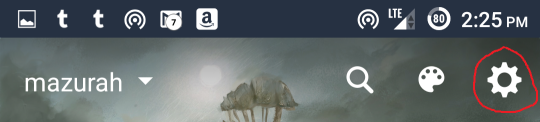
Then at the top of the screen click the little gear:
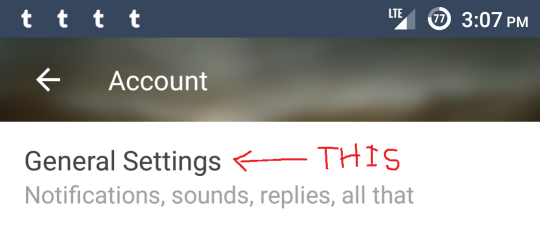
At the top of the screen find the option General Settings:
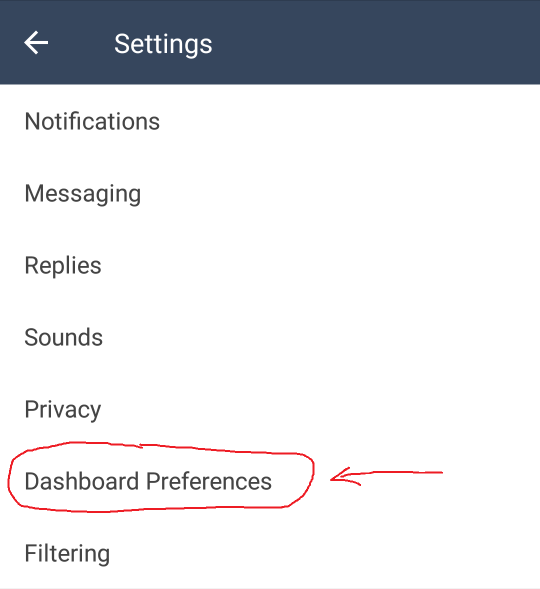
Then find Dashboard Preferences:
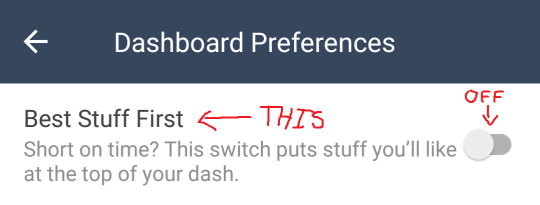
And switch “Best Stuff First” to the OFF position:
To reiterate, that’s:
Profile – Settings – General Settings – Dashboard Preferences – Best Stuff First – OFF
In my experience, settings DO extend across platforms, so if you turn it off on mobile, you should be good on the desktop version as well.
Please reblog!
Tags:
#The Great Tumblr Apocalypse #Tumblr: a User’s Guide #oh look an update #here’s a reminder for those of you who use mobile #now that they’ve actually released it



One thought on “”