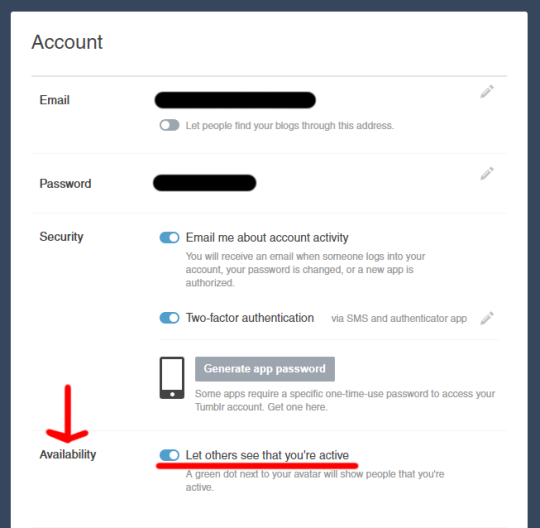
Hey guys, a quick note. Tumblr just added a ‘feature’ that shows if you’re online or not. The only place I see it is in the messenger, though it might be elsewhere. It’s showing a friend as online even though they just have a tumblr tab open that they haven’t looked at in hours. It also shows how long ago they were active. I don’t know how it interacts with the app.
I have a few problems with this:
I personally don’t like the feeling of being stalked
People could actually stalk you
Person A could get mad at Person B because it said Person B was online but they weren’t (and thus didn’t respond) – or just wasn’t up to talking
Person X could message Person Y and get anxious when person Y doesn’t respond, since it says they’re online
I found the place to turn it off in account settings. There’s a section called “Availability” where you can toggle off the functionality.
Safe browsing, folks.
Tags:
#The Great Tumblr Apocalypse #Tumblr: a User’s Guide #(didn’t reblog this right away because it wasn’t showing up for me yet and I wanted to check it for myself first) #(still not seeing any green dots (maybe just looking in the wrong places) but the availability option has shown up now) #((I turned it off))