
{{previous post in sequence}}


evilkitten3:

brittajj26:

asoiafuniversity:

TUMBLR 101: HOW TAGS WORK! (May 2017)

Tags vs. Search

The first 5 tags!

  • The first 5 tags are your best bet! 
  • Only the first 5 tags show up in tracked tags. Tracked tags are more reliable than search if you want your content to be seen and / or reblogged.
  • Put the important tags (ex. show name, actor name, artist name) in the first 5 tags.
  • Only the first 20 tags show up in search.
  • Only the first 20 tags will cause the post to show up in the tag on your blog
    (i.e. asoiafuniversity.tumblr.com/tagged/resources)
  • So start with the important tags for tracked tags / search, then add tags like “my edits” or “mine” for your own blog organization, and then add FEELINGS and TAG COMMENTARY at the end. 
  • Only new posts will show up in public tracked tags or search. Reblogs will not show up in tracked tags or search.
  • Avoid unnecessary punctuation. Apostrophes ’ are ok to use, but tags with a slash / or a hyphen or a plus sign + or an equal sign = will NOT show up in tracked tags. 

External Links

Tagging Etiquette

  • Don’t tag your hate; it’s considered rude
  • If you use anti tags like #ANTI SHIPNAME, everyone who is searching for SHIPNAME will see your anti post. Don’t use SHIPNAME when creating your anti tag if you don’t want people to get upset about it. 
  • Don’t put something that isn’t an edit in an edit tag. People are going into the edit tag to look for edits and if your post isn’t an edit, it defeats the purpose of the edit tag
  • Don’t spam the tags. 
  • Reblog; don’t repost
  • The OP (original poster) will often read your tags when you reblog a post, so if you say something nasty in the tags, the OP will (probably) see it. Say something nice instead!

Other useful tips:

Inspired by this post

Reblogging for future reference! Very helpful, Tumblr – thank you!

reblog to save a life


Tags:

#Tumblr: a User’s Guide #the last time I saw a guide to tagging it was before the search function #apparently this is how the search function affects things #good to know
sinesalvatorem:

tisfan:

sockrelatedchaos:

yugihell:

I am instituting a new rule. If you ever make anything for/inspired by me, I definitely will want to see it. So given that tumblr shows a complete inability to consistently notify about tagged posts, please message me a link. Even if it’s:

[link*screams and runs away*

Because I always, always want to see it, you will not bother me, and apparently we’re going to just have to work around this hellsite.

If you tag me in anything and I don’t at least ❤like it, I haven’t seen it and you should link me.

^^ this

Same here! Even if it’s just you seeing something that reminds you of me, I’d love to be @ tagged!


Tags:

#Tumblr: a User’s Guide #yes this #(at least it’s visibly clear when a tagging attempt has failed) #(if the tag isn’t a link to the tagged person’s blog then the tag didn’t work)

Tumblr, please explain why you have stuck this nearly-two-year-old post into my dash as if it were new.

Yes, I am tracking one of the tags it was posted in. Yes, nothing new has been posted in the tag since I started tracking it (though there have been things posted since the above post was made). These are not good excuses.

I’m not sure if it makes it better or worse that I’d already pressed the “like” button on the post previously. On the one hand, you definitely know I’ve read it, so there’s less point in showing it to me again. On the other hand, showing me an unmarked old post is less likely to lead to horrible misunderstandings if I’ve seen it before.

(The thing where you show me a given tracked-tag post several times over the following couple of days was tolerable enough, but this is an entirely different level of bad.)


Tags:

#bluespace #oh look an original post #Tumblr: a User’s Guide #I recently figured out which XKit setting was preventing tracked-tag posts from showing up in my dash #and removed it #I think I’m beginning to understand why they were getting blocked

vriskamylove:

I’m the kind of person that will delete and retype an entire tag sentence if I make a typo and that’s really all you need to know about my personality


Tags:

#same #sometimes #if I’m writing a particularly long or tricky tag ramble #I compose the tag-sequence draft in a notepad and then copy it in #so I can edit it more easily while I’m writing #this also probably says a lot about me

support:

For several years, the Tumblr help docs have mirrored the Tumblr experience: clean and simple. And that was fine. But as we’ve added features and choices and compatibility and complexity, the whole Tumblr experience has gotten richer and it feels like our documentation should reflect that too.

Introducing the new Tumblr help center. At tumblr.com/help, you’ll find

  • Better, more thorough search results
  • An improved, much-more-Tumblry look and feel
  • An announcements section at the top of the page for recent changes and news
  • All the same helpful content you know and love

Thanks for using the site and for giving us something to write help center articles about, Tumblr. 💗


Tags:

#Tumblr: a User’s Guide #The Great Tumblr Apocalypse

cosmic-llin:

PSA: If you don’t want to see a creepy horror ad where a girl crawls out of a Tumblr post towards you, Tumblr Savior the word “rings”.


Tags:

#PSA #I can’t vouch for this myself #(it might only be for Brits) #(seems like most if not all Tumblr ads are country-specific) #but it’s worth a shot #Tumblr: a User’s Guide

somnilogical:

somnilogical:

Whenever I post something with p values, tumblr deletes the part after the less than sign. This is very frustrating!

I had commentary on that article tumblr! And you deleted it! I just got to the point that stopped copying everything before posting it because I trusted you. Arggggh!

Textarea Cache? (That way you never have to decide whether you trust a text field enough to not copy it.) I don’t know if there’s a Chrome equivalent, and unfortunately I’m pretty sure there isn’t an Android Firefox equivalent.


Tags:

#Textarea Cache saved me this very afternoon #from having to rewrite a complaint I filed with Canadian Blood Services #(they used to test you for anemia as the *first* part of the screening) #(but the higher-up rearranged things and now it’s *last*) #(so I had to wait *40 minutes* to learn my iron hadn’t recovered from my previous donation) #(when previously I would only have wasted 5 minutes) #((it really ought to have recovered by now though)) #((it’s been four months)) #((going to talk to my doctor about iron supplements)) #anyway #Tumblr: a User’s Guide #reply via reblog #tangents

YO REALLY BIG ANNOUNCEMENT AND WARNING TO YALL

the-man-who-sold-za-warudo:

sheepmommy:

Staff did a really stupid and stealthy hotfix to the messaging system, where the new IM noises are incredibly loud, annoying screaming, laughing, ‘creepy’ noises in “””Halloween Spirit”””

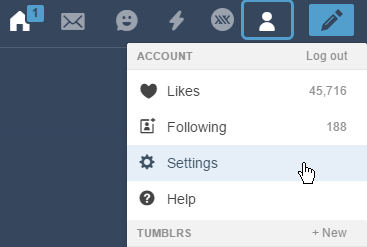
if you don’t want to be harassed by these god-awful panic inducing noises then just go to your Settings >

Stupid Halloween Messaging Noises 1

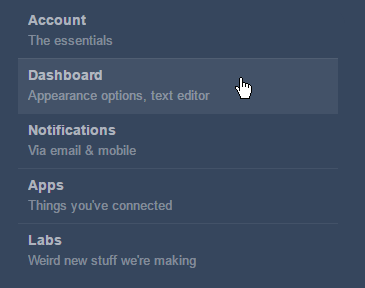
Dashboard tab > 

Stupid Halloween Messaging Noises 2

and make sure that your messaging sounds are turned OFF, to the LEFT

Stupid Halloween Messaging Noises 3

y’all should probably spread this post to avoid causing anyone panic attacks from random, loud BWAHAHAHAs.

there was a guy screaming NO NOOOO every message and I thought I was going insane.


Tags:

#The Great Tumblr Apocalypse #Tumblr: a User’s Guide #PSA #bluespace