HELLO YES I have found an actual good solution to our dearly departed rabb.it!
It is…. *drumroll*…
Discord screen sharing!
I think most people have Discord nowadays (and if you don’t, get it, it is eight million times better than Skype and requires way less personal information)
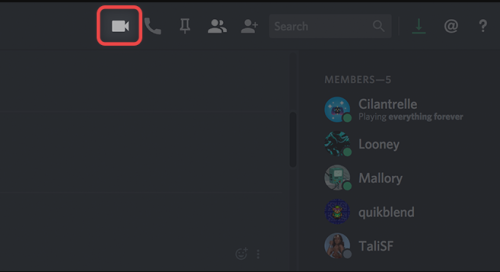
If you have a chat of up to 9 members, just hit that video call button
After the call starts, hit the “Screen Share” icon
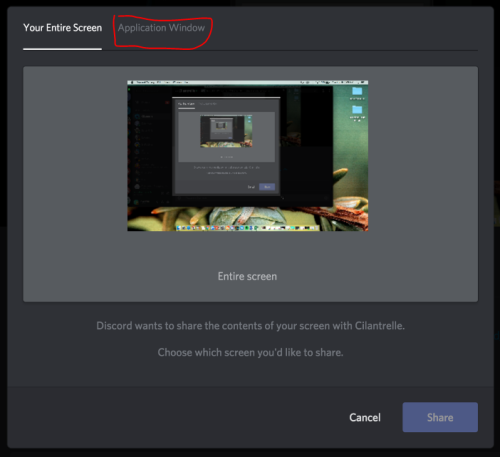
Click the “Application Window” tab, then select the window that has Netflix/Hulu/Youtube/whatever open
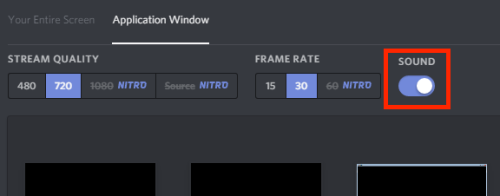
Make sure that the “sound” toggle is on so that people can hear the sound playing in that window
And then once it’s shared, just pull up your Netflix/Youtube/whatever window up and press play!
Only that window will be shared, so you can go back to the Discord window and chat with people without interrupting the video. You can voice chat over it as well, if you want!
The highest video settings without Nitro are 30fps, but when I tested it the video and audio were both pretty good. Better than rabbit, according to the friend I was testing it with. :D
The only drawback I’ve found is this:
But overall, it seems like this is the best option compared to the limited rabbit alternatives I’ve tested so far.
A little more detail: Currently (July 9 2019) the only way to HOST is by using the Discord app on a Windows computer, but you can WATCH via the app, browser, or mobile app on Windows or Mac.
Also, audio might not work if you use firefox, so just open up your video in a Chrome browser and it should work fine.
#Discord #interesting #the more you know #(I never used rabb.it myself) #(I’ve done plenty of watching TV together with Internet friends but it’s always been bring-your-own-copy)