Treat anything on Discord as media that will be lost
Do not use Discord to host your files. Do not rely on Discord to preserve your text. DO NOT RELY ON DISCORD FOR ANY KIND OF PRESERVATION OR HOSTING!!
It CAN be lost, it WILL be lost! You must consider Discord as a part of the Core Internet, controlled by one company that hosts the servers.
I thought it was impressive at first that it replaced IRC, but now I am horrified. If the company behind Discord went under today, how many friends would you lose?
How many relationships? How much writing?
You may think this won’t happen, but I remember when AIM went down and along with it, entire novels worth of interaction with my oldest friend.
IT CAN HAPPEN TO YOU. IT WILL HAPPEN AGAIN. NO COMPANY IS INFALLIBLE.
Back up your files! Download anything you’ve saved to Discord NOW, before the API changes go into effect! And DO NOT RELY ON THEM FOR HOLDING IMPORTANT FILES!
Here is a program that lets you download any and all of your discord DMs, your servers, everything. You can set the format (raw text, html (dark and light), and others. You can even download the uploaded files not just the text, though that may be just for the command-line version not the GUI window version.
Please back up your conversations, your stories. I have a backup of everything I care about that runs once a week, with full attachment backups every several months. I write stories on discord, and would be devastated if someone happened to them. You have to have your own local copies of every file you care about.
Tags:
#Discord #amnesia cw #101 Uses for Infrastructureless Computers #PSA #recs #DiscordChatExporter is amazing #highly‚ highly recommended #though note that due to limitations on Discord’s end‚ it can’t preserve info on *who* used reaction emojis #if you’re extremely stubborn like me‚ you can open up the raw HTML and manually edit that into the hovertext #if not‚ don’t let the perfect be the enemy of the good #even an unmodded export is incredibly valuable #(from my perspective‚ here on the other side of the queue‚ I reblogged that post on offline-first smartphones less than an hour ago) #(and I will note that the *text* of DiscordChatExporter HTML exports is visible on mobile‚ but not the images) #(even if you turned media downloads on (and do make sure to turn media downloads on)) #(not sure if there’s some tinkering I could do to make that work: I *mostly* re-read chat logs on a laptop) #this post was queued because my to-reblog list is too long and I didn’t want to dump it on you all at once
PSA: If you are using Pluralkit or Tubberbox, go save your avatar files NOW.
Discord has been implementing a feature where direct links to images uploaded to Discord will no longer work after 24 hours. If you want more information, please check out this post by twilight-sparkle-irl. As Pluralkit and Tubberbox both use the direct links for images uploaded to discord for member avatars, this will likely affect these two bots.
I’ve talked to the Pluralkit devs and they have informed me that Pluralkit and Tubberbox devs are in talks with Discord to see how this will affect the bots. No updates as of yet but once I hear anything I’ll update this post.
In the meanwhile, I highly suggest everyone to save alter avatars if they can. I’ll be providing a link to an external tool that you can use in the reblogs of this post.
UPDATE: One of the helpers/mods for Pluralkit/Tupperbox has made a post about the situation. I definitely recommend people to read it when they can. If Tumblr breaks the link, I have a reblogged version of this post with the link there.
Tags:
#the PSAs I’ve seen focus mostly on Pluralkit et al because it’s easier to overlook the effects on them #but this does also mean that in general‚ using Discord as an image host in non-Discord places is going to break #so here is your warning to go and settle your Discord-image-hosting affairs #(TBH Discord should never have allowed completely unrestricted image hosting in the first place) #(it was never going to last: all that allowing it does is) #(encourage your users to come to rely on something that will inevitably be yanked out from under them) #((I feel like the overall impression I’ve gotten from all the various posts about enshittification and zero-interest-rate phenomena)) #((is that we do not‚ actually‚ have a high enough tech level to pull off an image-heavy Internet)) #((we can pretend‚ for a while‚ but the debts come due)) #PSA #Discord #disappointed permanent resident of The Future #101 Uses for Infrastructureless Computers #amnesia cw?
It doesn’t get talked about enough, but This Discord Has Ghosts In It is a rad example of how you can adapt game design to your surroundings.
Basically, This Discord Has Ghosts In It is a digital larp. It’s Phasmophobia played by chat. Your group creates a discord server to function as a haunted house, then you all explore it, building new ‘rooms’ out of channels as you go.
Some players take the roles of ghosts, and are muted but can affect the environment in the haunted house.
Other players take the roles of explorers, and can talk, but the ghosts are all listening.
Discord wasn’t built to be gamified this way, but that doesn’t matter.
As long as you can guarantee consistent behavior from a thing, you can build mechanics off of it.
Anything in your environment can be turned into a game.
And in this particular case, it’s a really good one!
The mechanics lend themselves well to the kinds of pacing, limited communication, and untrustworthy setting that any good ghost story needs.
imagine how much information will vanish forever when discord eventually gets bought out by a company that destroys it and everyone abandons ship. can we please go back to putting info and other help on forums please
At this point, I’m pretty much convinced that going the Wikipedia route and incorporating as a non-profit is the only viable route for any long term tech project.
Tags:
#yeah I don’t get the trend towards info/help Discord servers #(I don’t really get servers in general tbh) #also one is none #I keep chat logs and I highly recommend it #Discord #101 Uses for Infrastructureless Computers #amnesia cw
NSFW servers and channels will still be allowed on Android devices and on desktop, but I know a lot of iPhone users who use Discord for kink and sex work and this update will completely cut you off from that on your device.
Tags:
#Discord has been going downhill for some time #god I’m so tired of all this shit #both the NSFW purges and #generally having to keep migrating from one messaging service to another as each one fails and/or turns against its users #(I don’t use iOS but the writing’s on the wall‚ you know?) #(and the bastards at Discord *have* already forced me to give them a phone number‚ which I was *not* comfortable with) #((no they were not fooled by a VoIP)) #we should just fucking email each other #for a more IM-y email interface I’ve been hearing some intriguing things about Delta Chat #mutuals if you want to exchange email addresses hmu #Discord #tag rambles #PSA #disappointed permanent resident of The Future
HELLO YES I have found an actual good solution to our dearly departed rabb.it!
It is…. *drumroll*…
Discord screen sharing!
I think most people have Discord nowadays (and if you don’t, get it, it is eight million times better than Skype and requires way less personal information)
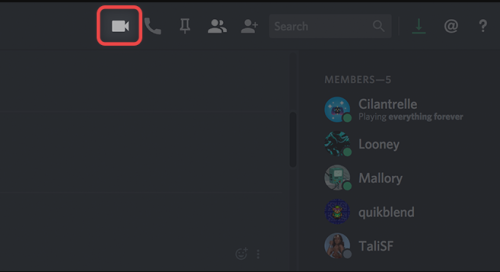
If you have a chat of up to 9 members, just hit that video call button
After the call starts, hit the “Screen Share” icon
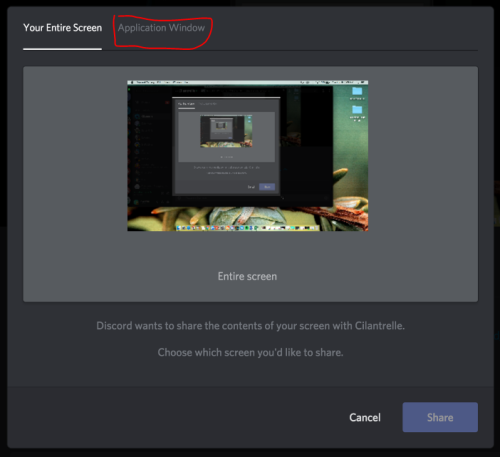
Click the “Application Window” tab, then select the window that has Netflix/Hulu/Youtube/whatever open
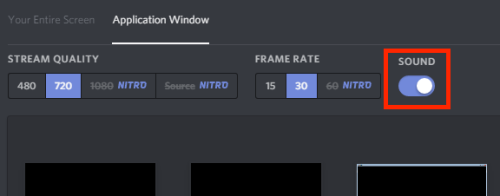
Make sure that the “sound” toggle is on so that people can hear the sound playing in that window
And then once it’s shared, just pull up your Netflix/Youtube/whatever window up and press play!
Only that window will be shared, so you can go back to the Discord window and chat with people without interrupting the video. You can voice chat over it as well, if you want!
The highest video settings without Nitro are 30fps, but when I tested it the video and audio were both pretty good. Better than rabbit, according to the friend I was testing it with. :D
The only drawback I’ve found is this:
But overall, it seems like this is the best option compared to the limited rabbit alternatives I’ve tested so far.
A little more detail: Currently (July 9 2019) the only way to HOST is by using the Discord app on a Windows computer, but you can WATCH via the app, browser, or mobile app on Windows or Mac.
Also, audio might not work if you use firefox, so just open up your video in a Chrome browser and it should work fine.
#Discord #interesting #the more you know #(I never used rabb.it myself) #(I’ve done plenty of watching TV together with Internet friends but it’s always been bring-your-own-copy)