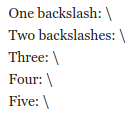
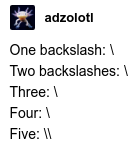
One backslash: \ Two backslashes: \ Three: \ Four: \ Five: \
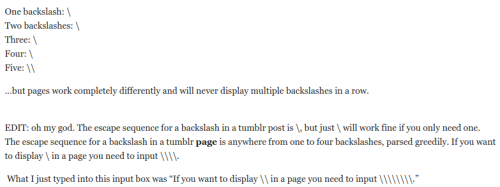
…but pages work completely differently and will never display multiple backslashes in a row.
EDIT: oh my god. The escape sequence for a backslash in a tumblr post is \, but just \ will work fine if you only need one. The escape sequence for a backslash in a tumblr page is anywhere from one to four backslashes, parsed greedily. If you want to display \ in a page you need to input .
What I just typed into this input box was “If you want to display \ in a page you need to input \.”
Also: every time you edit a page it reduces the length of each string of backslashes by a factor of two.
Alice wants her About page to say “Double \ backslashes are fun!”
The canonical way to do this:
* Type “Double \ backslashes are fun!” into the edit box. * Hit “Update Preview”. It will show “Double \ backslashes are fun!”; ignore it, it’s wrong. But now there’s a Save button! * Save. Go view your About page, which says “Double \ backslashes are fun!”. Yay! * Never edit your About page again.
If you do make the mistake of editing your About page, you will see “Double \ backslashes are fun!” in the edit box and also in the preview. Be sure to correct \ to \; if you don’t, then the next time you save, your About page will look like “Double \ backslashes are fun!” and the next time you edit you’ll see “Double \ backslashes are fun!” in the preview and so on until you give up and make a Dreamwidth account.
…
Post previews are broken, but in the opposite direction; instead of underinterpreting backslashes twice over, they overinterpret them a single time. If I hit “Preview” right now, this is what I see:
Fortunately, I think posts are stable and don’t mess up your backslashes when you edit them.
Quick update: every time you reblog it parses the previous posts an extra time, so if you have a long reblog chain, the OP will eventually be stripped of all but one backslash in each sequence.
Reblog to destroy the backslashes! I’ll start by typing 64 of them: \\\\\\\\
To clarify: if you go to my Tumblr and view the reblog immediately above this one, you see this:
But if you view that same reblog in your feed, you see this:
This is an exciting new discovery: Tumblr has a “first one’s free” policy on reblogs viewed from the feed; only the SECOND reblog will start cutting into your backslashes. But at least on my theme+browser+OS+bloodtype combination, this policy does not apply to someone’s Tumblr viewed directly.
If I’m wrong about how any of this works, shame on you for bothering to check.
Tags:
#Tumblr: a User’s Guide #anything that makes me laugh this much deserves a reblog #(”until you give up and make a Dreamwidth account”) #((…how the fuck am I going to archive this)) #((I guess I’ll just treat however it appears in my tumblr-utils scrape as the canonical version)) #((that’s usually where I pull from when adding new posts to the WordPress))