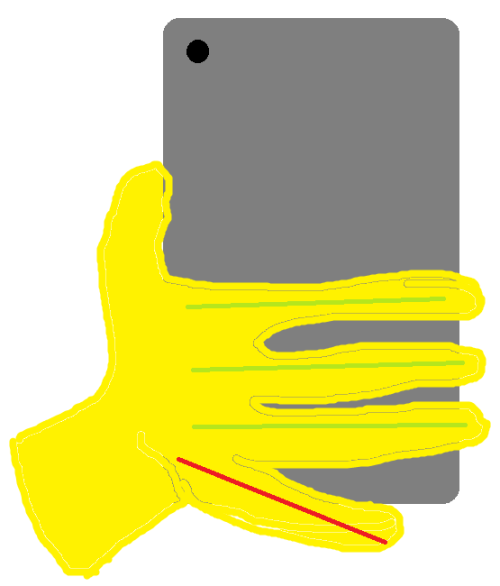
shitty MS Paint 3 minutes doodle, nto entirely accurate: When you have your pinky hooked on the “bottom” edge of the phone for the extra security so it doesn’t slide out of your hand that easily, you’re wreaking damage on your hand, since the pinky is extremely askew from it’s resting position. You might have noticed that when you hold your phone like that for long time it begins to hurt, like when you are gripping a pen too tightly for example.
Green lines – the fingers are going their natural way. Red line – the pinky is way off, that’s bad.
I got one of the ring things that folds out and I find it quite nice (altho I placed it a little high on phone, I ought to move it down)
also I put on a bunch of grippy stickers. really improves the experience imo
Tags:
#I had the opposite reaction to theclockworkjules #”oh god do I do this??” #”oh god I probably do this” #”oh no” #(”at least I don’t hold my phone as much as a lot of people do (because I mostly use my laptop instead) #so maybe hopefully it won’t hurt me too much?”) #next day: *holding my phone* #*looks down* #”…oh” #”apparently I do *not* do this” #”phew” #PSA #injury cw #Brin owns *two* 2010’s computers now #(…that tag is officially outdated now that I have a 2020-model smartphone‚ but fuck it)
ugh when your phone dies your authenticator accounts die with it, that’s a nuisance.
Authy stores your authenticator codes in the cloud, which seems like an unacceptable security risk until you have a phone die with no way of restoring from backup and it took all your 2FA codes with it.
If you’re using Google Authenticator, I recommend Authy with a complex passphrase instead unless you’re Snowden-level paranoid.
Back when I used Google Authenticator, I put TOTP on as few accounts as possible precisely because I was worried about the lack of backups.
Then I learned about andOTP, and now I put TOTP on everything that allows it and keep an export file in my backups. The password on the export file is a bunch of gibberish kept in a KeePass vault.
(*SMS* verification, however, is still bullshit.)
Tags:
#reply via reblog #recs #Brin owns *two* 2010’s computers now #101 Uses for Infrastructureless Computers #amnesia cw?
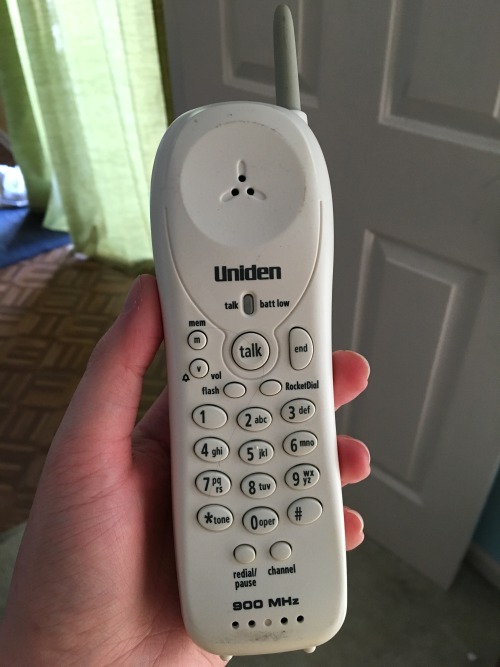
it was a fucking house phone that i was so stoked to have because it was mine that i kept in my own room and i cannot believe technology has progressed at the speed of FUCKING light to the point where this is a hilarious artifact to have had in like 6th grade and now theres kindergarteners with iphones
each button made a different tone so the numbers you dialed a lot became a subconscious melody in your head and if you hit the wrong button by accident it would sound like a wrong note in a song you know by heart
Do you notice how the question says “how did you know if you dialed the right number” *full stop*, but the *answer* is specific to “numbers you dialed a lot”?
Yeah, dialing numbers you *didn’t* dial a lot–which was just about all of them if you were a kid! it’s not like kids have much reason to talk on house phones, not being in charge of coordinating any appointments and not having had much time to accumulate friends-no-longer-in-physical-proximity!–was *exactly* as anxiety-ridden as it sounds. It’s such a relief to have screens to double-check with. Even *dumbphones* like the phone at work have screens now.
(Plus phones with screens *also* make the button tones, as a second layer of defence. Do y’all not have the button tones on your smartphones? Did you turn them off?)
I’m not sure if the button sounds on my phone defaulted to off or if I turned them off by choice, but I have never felt any need to turn them on. This probably relates to the fact that I can’t remember a melody without words and that phone numbers do not adhere to the melodic principles of Boethius anyway (okay, I never actually made any sense of Boethius, but he was the “Great Book” cited on Why Music We Don’t Like Is Objectively Bad and as a side note Stop Liking Pentatonic As A Scale It’s Unchristian) uhhh where was I. Right. I can’t remember numbers anyway, I can’t remember the little tune associated with the numbers, so they just all sound wrong. It occurs to me though, and the deficiencies of my auditory memory may be assessed by the fact that I’m not actually sure, but in the part of my day job that involves helping set up brand new phones and then telling the person “now please dial our test call number which is such and such”, I don’t think I usually hear dialing beeps before the announcement. Maybe new smartphones come with the dialpad beeps off by default.
There is a distinct possibility that smartphone button tones are opt-in, and my family is just in the habit of switching them on. As it happens, my first-ever SIM card† is currently in the mail, so I guess it will soon be time for me to investigate a phone app’s settings myself.
—
@sigmaleph [link], there’s still the part where you’re waiting for them to pick up! And it’s been my experience that often *somebody else* will pick up the phone, and then you have to sort out whether this person is sharing a phone line with the intended person or whether they’re completely unrelated.
—
†not counting the PC Mobile one that came with my first phone, which I never activated
Tags:
#reply via reblog #Brin owns *two* 2010’s computers now #proud citizen of The Future #amnesia cw #is the blue I see the same as the blue you see
is there an easy, consistent way to get someone to wake up when they’re just in a deep sleep? i was woken up multiple times by my girlfriend today, but kept falling asleep – it’s a good thing she didn’t bring me the coffee she’d made, i’ve previously kept it in an unsafe place while not thinking about it much because sleepy, and then it spilled
i think that getting me to stand up would probably do it? not sure tho, wondering if people have experiences with it
Would it help to use one of those alarm apps that waits until you’re in a lighter part of your sleep cycle before waking you? I’ve used this one [link] and liked it.
Tags:
#recs #Brin owns *two* 2010’s computers now #reply via reblog
i guess now that phones are a thing you dont need a watch but pre-phone everyone who didnt wear a watch was a fucking chump, and itrs STILL a good idea now cuz what if youre in a no-phone situation, or just dontr want to bring your phone, etc
(i stopped cause the strap broke and kept needing to be replaced and I decided it wasn’t actually worth the effort to figure how to find someone who would sell me a non-shitty watch strap when I already was carrying a phone with me at all times. The watch itself is fine and I could totally go back to using it)
i remember the era before everyone had a phone though. People kept asking me the time.
I get compliments on my watch sometimes at work. The customers think it’s a by-electronics-standards antique, guessing that it’s from the 80′s. Actually I bought it at Walmart in like 2013 for $20, and they’re still readily available for not that much more [link].
I really like this design: it’s elegant, shiny, doesn’t depend on Velcro (which wears out a lot faster than clasps) like most of my childhood watches did. It runs slow by about one second every 2.5 days: roughly once a month I sync it with time.gov.
Even now that I have a phone I plan to replace this watch if/when it wears out, preferably with an identical one. I like being able to just glance at it rather than have to take my phone out, dumbwatches are permitted in many contexts (work, exam rooms) where general-purpose computers are not, and the battery lasts much, *much* longer than a phone or smartwatch battery. I’m not sure I’ve *ever* had to recharge this watch, and if I did it was only once.
Tags:
#reply via reblog #recs #in which Brin has a job #Brin owns *two* 2010’s computers now #and I’m not sure if this fits the spirit of the tag but it certainly fits the letter: #101 Uses for Infrastructureless Computers
I had the weirdest dream last night where it was about a next big meme trend, and it was basically another this vs that meme but it was “Lock screen vs Home screen” whereas the lock screen was depicted as something formal and relatively uninteresting like a businessman sitting at a desk while the home screen was always something chaotic and insane like gorillas fighting alligators and it. People would take sides online on which person they were more like, home screen or lock screen and it made absolutely no sense and I
Reality: The lock screen is full of high-contrast detail (currently a picture of me and the gf), the home screen is the lowest-contrast default background (currently a space pic) I can find so I can read app names.
I did not know until just now that it was possible to have the lock screen and home screen be different images, and I intend to change nothing about my phone now that I know.
(rolling waves on a body of water too large to see the edges, just as it has been for nearly five years [link])
Tags:
#I didn’t actually laugh aloud but it still amused me enough to reblog #high context jokes #effective altruism #dreams #reply via reblog #Brin owns *two* 2010’s computers now #the more you know
Hello, fellow citizens of The Future! I am writing this from my smartphone, because I can. I just bought it this afternoon.
I’ve never owned a smartphone before. I have a lot of waste-not-want-not issues about technology, and I was never quite able to justify a smartphone to my satisfaction. Even after my then-7.5-year-old MP3 player’s clickwheel began to fail four months ago, taking two clicks forward and one click back (or, worse, the other way around), I still tried to keep using it.
A few days ago, though, after a talk with my parents, I came to terms with the fact that it was time to move on. (Besides, I can give my old Sansa to my brother anyway, and he might be able to get a bit more use out of it. It’s still a step up from his current utter lack of handheld non-GBA computer.)
At that point, the question wasn’t so much *why* to get a smartphone as why *not*. I could get an MP3 player *without* Wi-Fi and camera and variety of other goodies, or I could get one *with*, in either case for less than I paid for the Sansa.
So, I bought an Alcatel Idol Mini. I haven’t set up the phone plan yet, but there’s a lot it can do without the SIM card. Almost everything I want it to do, really.
Of course, I can’t play around with it much yet, because of the whole school thing. Soon, phone. Soon, once all this pesky schoolwork is out of the way, you and I will spend some quality time getting to know each other.
(After all these years of gazing longingly from afar, I’ve finally got a smartphone. It’s beautiful and wonderful and *mine*, *finally* mine.)
P.S. (from laptop): Today is my Hebrew-calendar birthday. I didn’t intend for the phone to be a birthday present from myself, but it’s nice how that worked out.
depizan said: Happy birthday! And enjoy your phone. :)
Tags:
#(November 2014) #conversational aglets #wavered on whether this was worth agletting #but fuck it who said it had to be ~substantial~ #this is my blog and I will build a beautiful archive out of it #if you are uninterested or wish not to be caught off guard by blasts-from-the-past there is a conveniently blacklistable tag #(fun fact: I still don’t have a phone plan) #(my parents are almost never both using their phones at the same time so I just borrow one of those if I specifically need cell access) #(I have a VoIP account for making calls from Wi-Fi zones (and usually know where the closest Wi-Fi is at any given time)) #(if I trip and break my leg or something while walking alone I can still call for help: you don’t need a SIM card for 911) #(so overall I really don’t think I’d get $7/month of value out of having my own phone plan) #Brin owns *two* 2010’s computers now #adventures in human capitalism #tag rambles #101 Uses for Infrastructureless Computers #replies
#tag rambles #Brin owns *two* 2010’s computers now #proud citizen of The Future #our home and cherished land #home of the brave #*finally* managed to hunt down this post #(or maybe an identical text post‚ who knows) #didn’t manage to find any copy I’d have *originally* seen but hopefully this random person won’t mind #anyway #I was thinking about this post again while researching the Wi-Fi access on local public transit #(answer: most routes don’t have Wi-Fi and the exceptions are not routes that I am likely to use much) #(buses aren’t yet homes) #home is every public hotspot in town #home is every hotspot run by the county government (they all have the same name) #home is the grocery stores we go to in New York to stock up on cheaper and/or tastier American food #home is that one motel we always stop at for the night on the way to Massachusetts #home is a couple of hotel chains with Massachusetts branches we’ve stayed at over the years #home is every shopping district I’ve ever mapped #I like this post #I’m not a citizen of the world but I am a citizen of every place I’ve ever gotten to know #(admittedly if you restrict to places where my *laptop* connects to Wi-Fi automatically it’s a much smaller list) #(possibly just my house: I don’t think I’ve stayed at any hotels with this laptop and–unlike my phone– #laptops don’t inherit Wi-Fi settings from their predecessors) #(but I like the smartphone interpretation better) #((P.S. interestingly‚ I was unable to reblog this post on my first attempt because my house’s Wi-Fi glitched))
Laptop is in the shop almost certainly overnight at least. I can’t find the power cable for my old 2010 one. I probably can’t set up my Raspberry Pi, I know I don’t have the right adapter for it because I broke it. I might be able to use someone’s old AlphaSmart?
Laptop still in shop. I should get info tomorrow at least, emails say I’ll be called after 48 hours. I forgot to ask about the AlphaSmart.
Honestly I think the amount of stuff I’ve done and the fact that I have had chunks of happiness over the past several days and not injured myself at all is really suggestive of a lot of mental health improvement. Maybe it’s experiences, maybe it’s having more produce and sardines, but something’s working.
Update: Apple called this morning to say that I have a hard drive problem (that affects booting from USBs and persists when the drive is wiped, yet doesn’t present any issues when copying files off the drive? seems unlikely) or a motherboard problem. Apple wanted to charge $475 to fix it, which I declined.
I was able to install Xubuntu on it from USB, and it is “working”, in that it still can’t talk to the battery at all and that it seems to freeze sometimes. I’ll probably try to transfer files later today. I am still overall dissatisfied with this state of affairs, though.
I am happy that I have a computer right now, but this does create a bit of a dilemma. I’m not sure I can justify replacing this computer just because I want to play some video games without Linux support and be able to see how charged my battery is. I guess this might get worse in the future, which might also justify replacing it. I sure don’t know how to replace a motherboard myself, and it sounds like a huge pain.
It gets completely nonresponsive and requires a forced shutdown sometimes more than once daily
Still doesn’t show the battery level (acpi won’t work)
Sleep/wake issues, does not travel well (overheats in bag)
Cannot shut down properly
I also still haven’t put my files on this thing. “Mount a 200GB disk image, on an HFS-formatted drive, of an Ext4 partition with logical volume management, and then figure out how to decrypt an encrypted user folder, with the password but without being able to log into it” is something which sounds like it should be technically feasible but also kind of sounds like a nightmare, and I have a feeling that my current computer setup is really not my long-term setup. I can get files from SpiderOak but that will take a while and they won’t be as recent.
What’s going on with the disk image was that booting up my computer in Target Disk Mode and getting the data off of it, using a connected Mac, was such that I couldn’t mount or even really properly interpret a partition with logical volume management, so I just frickin’ copied the whole thing. Yadda yadda I should make more frequent cloud backups or actually figure out how to do regular nice usable backups to a drive or both. At least I have the files. Probably.
I will apparently have some support in repairing or replacing this machine, which biases me towards doing so. Also, I’ll want to use it for taking lecture notes and other time-sensitive outside-the-home uses, so freezing and being a pain to store while asleep are problematic. If I repair it, I’m pretty sure it needs a logic board replacement which I would really rather not do myself. (I don’t have the right screwdrivers, a good workspace, etc.) If I replace it, I should probably replace it with a Windows machine, because the only times I’ve used OSX recently have been gaming and taking the easy route in dealing with printers/scanners.
I don’t know much about shopping for non-Macs or using whatever the latest version of Windows is. Every time I interact with recent proprietary operating systems I do get the vague feeling that they are tending in a direction my computer is not, such that my experience with Windows XP and 2016-and-previous versions of OSX won’t necessarily generalize.
If anyone has advice on any of the above, let me know.
For replacement laptops, eBay is great, especially for people located in the United States. The laptop I am typing this on, which I recently bought from one of the refurbished-laptop stores that sell through eBay, was USD$300 *after* international shipping and import taxes. For an American, it would have been around USD$250.
My usual strategy for laptop buying is “get the best PC USD$300 can buy”. I generally find laptops at that price point strike a good balance between “cheap” and “will keep pace with my needs for the approximately three years it takes for a used laptop to die of old age anyway” ; if you need more from a laptop than I do, you may need a higher budget.
You might not need me to tell you this, but make sure you know what kind of specs you need in a computer (RAM quantity, storage space, number of CPUs, dedicated vs basic graphics, etc), and add a little to leave room to grow. When searching, keep an eye out for laptops that have been discounted because they have problems in areas you don’t care about or are willing to live with: my previous laptop was unusually cheap because it was incapable of standby and took several minutes to come out of hibernation, which was pretty easy to adapt to for someone with my usage pattern.
Since I only just got a Windows 10 machine yesterday, I can’t say much about it. I *can* say that I’m pretty much just keeping that partition around for gaming, and intend to continue using Ubuntu for my primary OS.
—
Rather than a dedicated backup drive, I just keep a full copy of my files on my smartphone [link], where they are readily accessible and can in fact–in most cases–be accessed directly from the drive itself. I gather that a lot of people have too much data to pull that method off easily, but even if you can’t do it *yet*, maybe keep it in mind for if/when the progression of smartphones’ increasing storage space catches up to your needs.
Yah. Used laptops are a lot cheaper than new laptops for entry-level performance.
The one huge downside is battery life. Batteries have improved quite a bit recently, and there are a lot more low-power CPUs on the market. So, even the low-end Chromebooks and such can trounce any used laptop in terms of battery life.
Yeah my $150 2015 chromebook, after 4 years of fairly regular use, only gets 5ish hours of battery life, down from almost 10, so if battery life is of interest you can get pretty good. On the other hand, it is not a powerful machine. This is mostly okay for my personal laptop.
#(since I’ve pretty much only ever had used laptops I’m whatever-the-opposite-of-spoiled-is on battery life) #(1.5 – 2 hours is simply how long a laptop battery lasts and so I don’t find it a cause for concern)]
holy shit
(ftr, I tested this laptop’s battery shortly after receiving it, got a result of 2 hours, and was pleased to have a battery life near the high end of normal)
—
What do you *use* a 5-hour laptop battery for, anyway? I mean, more battery life is always better all else equal, but when I need to computer for significant lengths of time off-grid that is what smartphones are for.
(Admittedly, my smartphone’s battery also sucks, at least by smartphone standards–sometimes it dies because I didn’t check it for 4 days and it only has a 3-day standby time, and that’s in airplane mode–but it’s much easier and cheaper to get a backup power pack for a phone than a laptop.)
(yes I *did* end up getting that solar-powered phone charger I wanted [link], and so far it’s been working pretty well)
For me the initial use case that caused me to buy an ultrabook type laptop with long battery life (in my case one of the 12in MacBooks), was college classes. Namely, situations where there would be multiple hours of straight through classes or something like a long evening class that would be four hours long.
It’s a bit less relevant now for me to have that type of battery life now that I’m out of college.
But the other benefit of the increase in laptop battery life is that even the high performance desktop replacement laptops are starting to get to the 2hr+ level of performance. Making desktops as a whole a lot less relevant as a platform because desktop replacement/”gaming” laptops have started to become actually usable as laptops and not just in effect really shitty small form factor desktops.
Good point, and I’m a little embarrassed not to have thought of that. The few times I have had some form of meatspace class I used a paper notebook, but I can see how that would be suboptimal or outright unsuitable in many cases, especially for a routine event.
(It’s interesting that we’ve now *both* made remarks that make no sense to someone with the other’s experience of college [link]. I guess we’re even?)
—
Also, even though the battery-monitor section of my phone settings did not *display* anything on its list of battery-draining apps, force-stopping TunnelBear improved my phone’s standby time tremendously. I will have to remember to shut that app down completely when I am not using it (and I’m usually not), not just setting it to off.
Tags:
#Brin owns *two* 2010’s computers now #reply via reblog #adventures in University Land #long post #101 Uses for Infrastructureless Computers
What do you *use* a 5-hour laptop battery for, anyway? I mean, more battery life is always better all else equal, but when I need to computer for significant lengths of time off-grid that is what smartphones are for.
Computers are just better than phones for every single task. [1] Sure, you use phones for off-grid time now, but that’s just because your computer doesn’t last long enough for that. I have a MacBook Air with 13 hours of battery life and it’s nice being able to use it all.
It’s also nice when I’m at home, being able to use it in the kitchen, on the sofa, etc. I move around a lot and it’s nice not having to also lug around the charger and plug it in everywhere.
If I wanted to leave a computer plugged in all the time, I’d be using a desktop, not a laptop.
[1] With some exceptions: Phones are really only good for very specific things like “taking photos”, “using mobile apps of companies too lazy to provide a desktop/web version” (I’m calling you out, Google Assistant and Pleco).
I do agree that laptops are better than phones whenever possible, which means the entire point of smartphones is for the times that it’s *not* possible. Why are smartphones so ubiquitous, then? Why do high-end phones even exist at all, if that kind of money can get you a laptop with double-digit-hour battery life?
(I mean, there’s something to be said for the smaller size. But laptops can be made pretty small too if you need them to be, and as I understand it most people haven’t already stuffed their bag with as much gear as possible [link] and would have space for a small laptop.)
—
I use a laptop rather than a desktop for two reasons:
1. I can use a couch rather than needing, like, a dedicated desk and shit.
2. I can take it to hotel rooms. (This was more important when we were richer and spending a week or two a year in hotel rooms, but there’s still reason 1 to think of.)
—
I use my laptop battery under the following conditions:
1. When the living room is too noisy and I need to temporarily move to another room. (Even then, I can just bring the power cord with me and plug it in there, and I do if I expect to be there for more than an hour and a half or so.)
2. Power outages. The *only* time that I wish my laptop battery life was longer, since it *is* annoying having to rely on a smartphone in my own goddamn house.
Well, I mean, I kind of glossed over the biggest advantage of smartphones over laptops: General portability, in terms of stuff like “can put in a pocket or small purse” (joke’s on everyone else, I just go around with a purse big enough to fit a small laptop), and “does not add much weight for you to carry”, and “can be easily brought out and used and put away”.
(Even a small laptop would be awkward to just take out and use while walking or standing in line.)
Which I assume is the real reason people usually use phones, because I can’t imagine anyone would prefer typing on a touchscreen to typing on a keyboard. People talk about how phones are fine for passive content consumption, but I was led to believe the youth of today spend all their time texting!
But like for the specific case of “using a phone because you’re off-grid for significant amounts of time”, clearly a laptop would be better.
Also this is really making me wish I’d taken a picture of my setup in Seattle, in which I totally set up my desktop right in front of the living room couch.
Also, nice utility belt! People are usually impressed when my bag seems to always have everything they need, but I still don’t have that much stuff.
>>I can’t imagine anyone would *prefer* typing on a touchscreen to typing on a keyboard. People talk about how phones are fine for passive content consumption, but I was led to believe the youth of today spend all their time texting!<<
I don’t know about those people who text all the time, but if *I* needed to do significant amounts of off-grid typing, I’d probably get one of those foldable keyboards. (The hard kind that merely fold in half or thirds, not the flexible kind that roll up: we have one of the flexible ones, and it is annoying to use.) I don’t think I have *quite* enough space for one right now, and I certainly wouldn’t use it often enough to justify…I think they were $30? But if it became a thing I routinely needed I’m pretty sure I could arrange to have one with me.
—
>>But like for the specific case of “using a phone because you’re off-grid for significant amounts of time”, clearly a laptop would be better.<<
I suspect you’re interpreting “off-grid” more strictly than I’ve been using it. If you do not, at this moment, have access to an electrical outlet and a Wi-Fi hotspot, you’re off-grid in every respect relevant to a computer, even if you are in the middle of a city at the time. If I’m standing in line, I’m probably off-grid (unless it’s a fancy enough line to have Wi-Fi, in which case I am only partly off-grid).
(for anyone about to say “but mobile data”: do I strike you as somebody with a good enough combination of situation and sanity to allow herself a data plan? [link])
(The main reason I wanted one of those solar-powered camping-focused phone chargers is *not* because I actually go camping: it’s because if my computer battery is finite I’m more reluctant than I should be to use it, the same way that people playing RPGs are stereotypically overly reluctant to use consumable buffs if they can’t reliably source replacements. It gives me peace of mind to know I can keep recharging my phone *even if the power outage continues*, even if in practice a power pack of the same size with no self-recharge capability would easily last me through any power outage I’ve ever experienced.
(The longest power outage we’ve had was 16 hours, starting ~1 hour after I woke up and ending ~2 hours after I went to bed. At the time I had a smartphone with a not-particularly-sucky battery and no power pack: I used it in a mildly power-consumption-optimised way for the first couple hours or so (screen on, no video), then began optimising more strongly for low power consumption (screen off, audio only).))
—
>>Also, nice utility belt!<<
Thank you! :D
Tags:
#anything that makes me laugh this much deserves a reblog #(”in which I totally set up my desktop right in front of the living room couch”) #reply via reblog #101 Uses for Infrastructureless Computers #Brin owns *two* 2010’s computers now #adventures in human capitalism