Could you tell me where you’re going?

eightyonekilograms:

eightyonekilograms:

eightyonekilograms:

Hi folks-

A lot of people are making posts announcing where they’ll be setting up shop after The End, and it’s already getting hard to keep track of who is going where under what name. So I created a public spreadsheet to try and keep track of this: https://1drv.ms/x/s!AtiG1bZTgp9RxpJ3smyiFe703LcJhA

Would you mind sticking your information in there? I prefilled a couple columns with some of the most common alternate services, but of course you can and should add a column if a service you’re moving to isn’t listed.

Don’t be a jerk and mess with anyone else’s row but yours. I can see the edit history and revert bad changes anyway, so it won’t do you any good.

I normally hate begging for reblogs, but please reblog this.

@metagorgon: “I can’t edit”

When you try to edit a cell, you should see a ribbon across the top saying that “this is in read-only mode”, but also a button to enable editing. Click on that and then you should be fine (if not, something is very wrong, because that is how it has worked for me and several other people so far.

One other thing: if you are signed in to an Outlook/O365 account, I can see your real name when you edit the doc. If that is a problem, open the link from a private browsing window.


Tags:

#The Great Tumblr Apocalypse #The Last Tumblr Apocalypse #reblog coercion cw #reblogging the version with that rather important addendum #I did not see this version before adding my info and I feel fortunate that my Outlook account is on my *other* browser #(I’m not sure I’m even *currently* logged in there but I’m *never* logged in here)

(I know I’ve been trying to stick to links in the “[link]” form lately, because–at least IME–these days it’s not always easy to tell in the dashboard view whether something is a link or not, but this post really does flow a lot better with embedded links.)

This notepad draft has been through a couple iterations today as I learn more stuff and think of more possibilities, but I guess I’ll post it now. Everything is still pretty up in the air, though.

I have made an account @brinbellway@pleroma.site. I do not know yet whether I will be posting anything there, or just reading. I will probably not stay on that instance long-term, unless maybe I only use it as a dashboard.

I made a Scuttlebutt account, but upon poking around in it I don’t think it’s really suitable for my current needs. I might try it someday, but not now.

I am fairly confident that my future OPs will be on Dreamwidth: https://brin-bellway.dreamwidth.org. There may also be link roundups and/or roundups of comments I’ve posted. 

Definitely for at least a little while, I will post links to new DW entries on Tumblr. The thought occurred to me this evening that I *could* do that indefinitely, and simply see whether the censors ever notice what some of those external posts are about.

Yes, I see the place is falling apart. Yes, I don’t trust the devs further than I could throw their server racks. Yes, I know they won’t want deviants like me here.

But what are they going to do? Delete me?

(You know what, I’m going to move the tag ramble into the main post body. I think I don’t want it to get left out of any reblogs, and if nothing else it’s less work for the future self cleaning up this WordPress-mirror entry.)

#I’m gonna go ahead and preserve the tag   #The Last Tumblr Apocalypse   #regardless of what happens next   #even if I end up not being in the first wave of evacuation I still believe   #that people looking back will see this as the beginning of the end   #but honestly the past couple days have been a fucking emotional whirlwind   #and I have not had enough sleep today   #and I don’t really know what I think anymore   #(and because this *is* still a Tumblr-hosted post I am trying very hard not to make any innuendos about any of that)   #just… bear with me‚ okay? bear with all of us‚ as we figure this out together


Tags:

#oh look an original post #The Great Tumblr Apocalypse #The Last Tumblr Apocalypse #Dreamwidth #Fediverse

When Tumblr bans porn, who loses?

{{Title link: https://www.vox.com/the-goods/2018/12/4/18126112/tumblr-porn-ban-verizon-ad-goals-sex-work-fandom }}

discoursedrome:

A lot of good info and comments here; I’m glad they got a chance to talk to @pervocracy in particular.

For the tl;dr, the big news here is that banning NSFW has been in the works for some time and was simply rushed out the door due to the app thing, and the real motivation is that few ad buyers are willing to buy ads that might show up next to porn. 

Porn on Tumblr is something Verizon needs to wipe out if it’s going to make any money off what it thinks is actually valuable about the platform — enormous fandom and social justice communities that, just before the Verizon acquisition, [former head of media brands Simon] Khalaf was insisting the staff figure out how to better monetize. 

This explains a number of things that were hard to contextualize at the time: the insistence on repeatedly turning on safe mode for everybody, and the push for non-chronological feeds, were likely intended to help increase the amount of “safe” pagespace they could sell higher-value ads on.

I’d noticed for a while that Tumblr was pushing the fandom angle very hard – the Radar and other highlight features are extremely fanart-oriented, and that was clearly also part of the motivation behind algorithmic feeds. However, I’d been presuming that this was just to facilitate marketing of the actual brands in question, like “pay Tumblr to highlight fandom content for your show so more people will get into it.” It sounds like they actually wanted to use fandoms as a general marketing demographic, which is a bit more ambitious but also makes more sense – you might want to reach MCU fans not just for MCU stuff but also for unrelated products that had conceptual crossover. 

If that’s the case, though, it means that the ban was even more foolhardy than I thought, since fandoms are going to be the first thing to vacate – sites like Dreamwidth are natural fits for that, and not only are they among the least tolerant of strict anti-NSFW guidelines, but they’re also the most likely to post the kind of SFW visual art that Tumblr is flagging for deletion because their algorithms suck.


Tags:

#hmm #interesting #The Great Tumblr Apocalypse #The Last Tumblr Apocalypse

So, uh, the webpage view [link] is showing me scrambled posts now. The post at the top of page 1 is 4 hours old (I’ve made several posts since then), and at the beginning of page *3* it starts showing posts in what looks like it might be the order of last *edit*: those few posts I’ve made since the page-1 posts, followed by some posts whose tags I updated [link].

Incognito mode does not seem to help.


Tags:

#oh look an original post #The Great Tumblr Apocalypse #I wonder what page this post will display on

serinemolecule:

unpretty:

i’m just gonna post all the ways i’ve found so far to get RSS Links They Don’t Want You To Know About from social media sites, because people keep Leaving Tumblr Forever in favor of sites that i’m not going to use

(if you don’t have an rss reader yet just make a feedly account, it takes about one whole minute, if you decide to use a different reader later you can export your whole list, it’s fine)

i’m gonna use strikethrough to indicate the text you need to replace and also include examples of feeds that seem to work

A General Rule

on almost any website look for the icon that looks like this

that’s the button that means ‘the rss feed is here’

Tumblr

just add /rss to the end of literally any blog’s url, including tags

i.e. unpretty.tumblr.com/rss or unpretty.tumblr.com/tagged/original/rss

now you can Leave Tumblr Forever and still follow blogs until such a time as tumblr implodes in earnest

Dreamwidth

use username.dreamwidth.org/data/rss 

i.e. gallusrostromegalus.dreamwidth.org/data/rss

WordPress

if it’s hosted on WordPress.com, just add /feed to the end of the url

if it’s self-hosted (i think around 20% of people who have their own website use wordpress to host it, i know i do bc it’s easy as sin) also just add /feed to the end the url

i.e. en.blog.wordpress.com/feed or kittyunpretty.com/feed

ArtStation

use username.artstation.com/rss

i.e. beccahallstedt.artstation.com/rss

Mastodon

just add .rss to the end of someone’s profile url

i.e. cybre.space/@kittyunpretty.rss

deviantART

use backend.deviantart.com/rss.xml?q=gallery%3Ausername 

i.e. backend.deviantart.com/rss.xml?q=gallery%3Aarvalis

YouTube

this one’s goddamn pain in the dick because you need to find the channel id first

in general youtube channels have a nonsense url like youtube.com/channel/abunchofbullshit

you have to take that last bit and plug it into youtube.com/feeds/videos.xml?channel_id=abunchofbullshit

i.e. youtube.com/feeds/videos.xml?channel_id=UCbpMy0Fg74eXXkvxJrtEn3w

Tapas

this is mostly handy for webcomics that were hosting on tumblr and crossposting, i think? i don’t know how tapas works for creators tbqh. anyway they’ve actually got a button at the top when you go to the comic page.
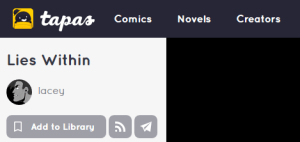
the one between ‘add to library’ and the paper airplane will give you the rss feed

LINE Webtoons

ditto wrt tumblr-hosted webcomics, and also having a button

the button to the left of the one that says +subscribe will get you the rss feed

Twitter & Instagram

these are the only two sites i’m including that don’t have native rss support, just because so goddamn many people have literally no other web presence at all for some reason

twitter used to have rss feeds but killed them, and i don’t think instagram ever had them. you have to use workarounds for these, and a lot of them end up getting killed, like TwitRSS.me. fetchrss seems to work okay but it costs money. if you pay for inoreader they’ve got built-in support for following twitter accounts but that’s not a practical solution for most people.

right now i use rsshub.app/platform/user/username

i.e. rsshub.app/twitter/user/dasharez0ne

… but the instagram one doesn’t actually seem to work, like, most of the time. i don’t know if i’ve found one that works ever. if you’re jumping ship there please consider doing the world the enormous goddamn favor of just making a free wordpress.com account and cross-posting all your instas with ifttt or something, rather than being totally at the mercy of mark zuckerberg

This is extremely overkill. Every RSS reader I know of is capable of finding an RSS link from a regular URL.

So, like, if you wanted to follow someone on YouTube, you could put in the feed URL:

https://www.youtube.com/feeds/videos.xml?channel_id=UCq6aw03lNILzV96UvEAASfQ

Or you could just put in their regular profile/channel URL:

https://www.youtube.com/user/billwurtz

And your RSS reader will give you a list of what feeds it has:

(pictured: Feedly, the RSS reader recommended by the OP, subscribing to a YouTube feed)

This also works for any other RSS reader and any other service (Tumblr, Dreamwidth, Twitter, anything):

(pictured: Inoreader, subscribing to a Tumblr feed)

Here’s Feedly, the RSS reader recommended by the OP, working on YouTube:

So yeah, there’s never any reason to dig up a channel ID and manually construct an RSS feed URL.

I’ve definitely had issues with the automatic finders in the past, mostly things like giving you the feed for an entire site when you asked for a particular subdomain. Though it’s been a while since I had such troubles: I’d figured it was just because I haven’t followed a lot of new RSS feeds lately, but possibly they’ve improved over the past 3 – 5 years.


Tags:

#reply via reblog #The Great Tumblr Apocalypse #The Last Tumblr Apocalypse #discourse cw? #long post

{{previous post in sequence}}


serinemolecule:

brin-bellway:

theopjones:

brin-bellway:

somnilogical:

brin-bellway:

@somnilogical, I wanted to thank you for your efforts in being a Tumblr Purge News Network. I’ve found it very helpful.

i like to do lots of meta when thinking of changes. im kind of using my tumblr to pinboard possibility-space of where humans could go

im also downloading every app and signing up for every website someone mentions and poking around in them to see what theyre like

Yeah, it’s bedtime for me now but tomorrow I’ll be doing some poking around too.

And researching backup methods for all the potential sites, because fuck having a mere single copy of anything.

(If I parsed the jargon correctly, this Mastodon backup program [link] is compatible with Pleroma? *If*. I’ll test it soon, probably tomorrow.)

If you self host Mastodon you could just back up straight from the database on your server.

Even if I get a handle on how to do that on a technical level, I’d need to rent a URL for it, right?

If I decide to settle down in the Fediverse I will seriously consider self-hosting, but I’m not ready to drop money on it yet.

Renting a domain for a URL is around $10/year.

Renting the shittiest server possible is already around $60/year, and I’d be surprised if the shittiest server possible would be enough to handle Mastodon. And the effect on your electric bill of using your own computer as a server is around $200/year

There also exist free domains, but like in no universe is $10/year not a drop in the bucket compared to the overall price of hosting a server.

Pleroma boasts that one can run an instance on a Raspberry Pi [link], but again this is really not my area and I would be unsurprised to learn that this is far less impressive than they are trying to make it sound.

Probably the figures I’ve encountered over the years about domain costs were actually varying levels of package deal.

I had some further details here about cost estimates, but honestly I think they’re beside the point. There exist *some* financial costs to self-hosting, and I could tell that much even without having any experience in such matters, and that was enough to dissuade me from jumping straight into the deep end. When and if (*big* if) I decide that I am willing to pay money for a server, *then* I’ll research exactly how much it would cost me and compare that figure to the amount I am willing to pay (not to mention the amount of effort involved in determining which knowledge and skills I would even need, and then acquiring them).


Tags:

#reply via reblog #The Great Tumblr Apocalypse #The Last Tumblr Apocalypse #Fediverse #adventures in human capitalism #discourse cw?


{{next post in sequence}}

rukkilill:

saixnipples:

First, a note: I ask that people please reblog this to spread this since the tags are kinda unusable right now, especially when a post has external links within it.

Dreamwidth has been my main active posting platform for a year and a half now, and I’ve noticed a lot of bloggers talking about jumping ship over to DW with tumblr’s uhhhhhh current state of affairs.

But DW is kinda bland and boring if you’re too young to have been of the LiveJournal generation, and therefore don’t know where to look or start in order to build your friends list and find communities, so I’m going to do some of the legwork for you.

the_great_tumblr_purge: I made a dw community specifically for people jumping ship from tumblr to reconnect with each other.

addme: a friending community where you pimp yourself out and find other people with similar interests that you might want to see on your reading page.

addme_fandom: similar to above, only with a stronger emphasis on finding people based on your fandoms.

fandomcalendar: a community where you can find fandom events, such as big bangs, exchanges, challenges, bingos, etc. and other fandom communities that might suit your interests.

questionoftheday: for when you don’t know what to post.

If anybody else has communities they want to add, go right ahead and add them in a reblog.

Please reblog this.

Going to +1 the rec of Fandom Calendar; I find it really a really useful comm for finding out about new fests and exchanges.

Would like to add the caveat that DW is a very different site from tumblr; it’s great if you love text-based blogging, but not necessarily useful for people whose fandom engagement is primarily image-focused. The site is what you make of it, though!


Tags:

#ooh questionoftheday looks like fun #The Great Tumblr Apocalypse #The Last Tumblr Apocalypse #Dreamwidth

Dreamwidth Starter Kit

{{Title link: http://bisharp.dreamwidth.org/233213.html }}

dreamwidth-help:

Links to things to:

  • Help people get set-up on Dreamwidth
  • Various tutorials for various purposes (some serving the same purpose but they’re written in different ways which has a variety of user-friendly options)
  • Bits and pieces of meta on Why Dreamwidth!
  • Where to begin, places to make friends, and how to make friends
  • etc, etc; always looking for more links to people helping others to be on Dreamwidth!

Tags:

#The Great Tumblr Apocalypse #The Last Tumblr Apocalypse #Dreamwidth

canmom:

I wrote a longer post but it basically boils down to… I wish people wouldn’t confuse Mastodon (software anyone can run to make a Mastodon instance), individual Mastodon instances (whose rules may be strict or lax, at the whim of the admins), and the ‘fediverse’ of Mastodon instances that may or may not be sharing content with one another (again depending on what the users interact with, and which other instances the admins of individual instances choose to defederate with)

Basically your experience of Mastodon will depend very very much which Mastodon instance you join, just like your experience of PHPBB will depend what forum you join, or your experience of IRC will depend on which server and rooms you join. Except not quite, because you might unexpectedly federate with other instances… but that’s a better comparison for what Mastodon is than centralised platforms with rules like Tumblr and Twitter.


Tags:

#The Great Tumblr Apocalypse #The Last Tumblr Apocalypse #Fediverse

unpretty:

i’m just gonna post all the ways i’ve found so far to get RSS Links They Don’t Want You To Know About from social media sites, because people keep Leaving Tumblr Forever in favor of sites that i’m not going to use

(if you don’t have an rss reader yet just make a feedly account, it takes about one whole minute, if you decide to use a different reader later you can export your whole list, it’s fine)

i’m gonna use strikethrough to indicate the text you need to replace and also include examples of feeds that seem to work

A General Rule

on almost any website look for the icon that looks like this

that’s the button that means ‘the rss feed is here’

Tumblr

just add /rss to the end of literally any blog’s url, including tags

i.e. unpretty.tumblr.com/rss or unpretty.tumblr.com/tagged/original/rss

now you can Leave Tumblr Forever and still follow blogs until such a time as tumblr implodes in earnest

Dreamwidth

use username.dreamwidth.org/data/rss 

i.e. gallusrostromegalus.dreamwidth.org/data/rss

WordPress

if it’s hosted on WordPress.com, just add /feed to the end of the url

if it’s self-hosted (i think around 20% of people who have their own website use wordpress to host it, i know i do bc it’s easy as sin) also just add /feed to the end the url

i.e. en.blog.wordpress.com/feed or kittyunpretty.com/feed

ArtStation

use username.artstation.com/rss

i.e. beccahallstedt.artstation.com/rss

Mastodon

just add .rss to the end of someone’s profile url

i.e. cybre.space/@kittyunpretty.rss

deviantART

use backend.deviantart.com/rss.xml?q=gallery%3Ausername 

i.e. backend.deviantart.com/rss.xml?q=gallery%3Aarvalis

YouTube

this one’s goddamn pain in the dick because you need to find the channel id first

in general youtube channels have a nonsense url like youtube.com/channel/abunchofbullshit

you have to take that last bit and plug it into youtube.com/feeds/videos.xml?channel_id=abunchofbullshit

i.e. youtube.com/feeds/videos.xml?channel_id=UCbpMy0Fg74eXXkvxJrtEn3w

Tapas

this is mostly handy for webcomics that were hosting on tumblr and crossposting, i think? i don’t know how tapas works for creators tbqh. anyway they’ve actually got a button at the top when you go to the comic page.

the one between ‘add to library’ and the paper airplane will give you the rss feed

LINE Webtoons

ditto wrt tumblr-hosted webcomics, and also having a button

the button to the left of the one that says +subscribe will get you the rss feed

Twitter & Instagram

these are the only two sites i’m including that don’t have native rss support, just because so goddamn many people have literally no other web presence at all for some reason

twitter used to have rss feeds but killed them, and i don’t think instagram ever had them. you have to use workarounds for these, and a lot of them end up getting killed, like TwitRSS.me. fetchrss seems to work okay but it costs money. if you pay for inoreader they’ve got built-in support for following twitter accounts but that’s not a practical solution for most people.

right now i use rsshub.app/platform/user/username

i.e. rsshub.app/twitter/user/dasharez0ne

… but the instagram one doesn’t actually seem to work, like, most of the time. i don’t know if i’ve found one that works ever. if you’re jumping ship there please consider doing the world the enormous goddamn favor of just making a free wordpress.com account and cross-posting all your instas with ifttt or something, rather than being totally at the mercy of mark zuckerberg


Tags:

#The Great Tumblr Apocalypse #The Last Tumblr Apocalypse #the more you know #(I use CommaFeed myself) #((and yes I keep an updated export file on hand)) #((I *used* to use Google Reader))